By now I am sure we all have heard how important backups of our important data are. I certainly know this lesson well. But still, I got bit. Being a "computer professional" I know better. My daughter told me a few days ago that her laptop quit working. That laptop and I have a long history. I have patched it together several times. But this time it was a different problem. It wouldn't boot.
Ugh. My heart sank. I had meaning to back it up, but just never had. All her papers and, most importantly, pictures and videos are on that hard drive. I tried a few of my best ideas, like booting Linux from a CD and trying to read the drive. Even took the drive out and put it into my main Linux machine and tried copying using "dd" but to to avail. Horrendous read errors all over the disk. That's actually the good news.
Why is that the good news? Because since it reads sometimes but has read errors all over the place, that is a strong indication that it is NOT the data corrupted. Instead, it seems more like an electronics / controller board problem. If it were the data on the drive it would likely be more consistent. I have, a long, long time ago, fixed drives with similar problems by replacing the controller board with an identical one from another drive. I don't have one like hers easily available, but there is a service that advertises exactly that sort of thing online: Outsource Data Recovery in Cleveland Ohio.
Before I go any further let me tell you what I did wrong. Trying to access the drive myself could have caused further damage. If you ever find yourself in a similar situation, shut off the computer and remove the drive and don't do anything with it until you consult a professional. Every bit of use after the first problem decreases the chances of successful data recovery.
OK, on with the story. Outsource advertises "$60 hard drive repairs." If the problem is as simple as mine appears to be, they advertise they can repair the electronics for essentially a $60 flat fee. If the problem is more in depth they will let you know and let you decide what to do. I looked around online for more information and reviews of their service. There are not a lot. I found about 8 good reviews, pretty much all giving five stars, and one bad one. The one bad one did sound a bit flaky, like someone who didn't really know what they were talking about. Over half the good ones were on either the company's own web site or their Google plus page. So the details are a bit sketchy. The Better Business Bureau in Cleveland Ohio has them listed, and has no complaints lodged against them. They are not a member of the BBB.
So, I have decided to give them a try. I will file a ticket with them and send the drive to them. I am hopeful. I think there is a good chance of success. I will report back with the results.
The lesson here is: don't put off your backups. Find a good backup strategy and stick to it. Back up your phone or tablet too. These days we carry our lives around in our pocket and it only takes a second to lose everything. I bought a new 4 terabyte external drive to do my backups on. I'm going now to continue backing up all my important data. Maybe you should too.
Friday, July 3, 2015

Sunday, June 28, 2015
The Case for Space
Today was a disappointing day when a SpaceX Falcon 9 rocket exploded a little over two minutes after liftoff. It was a lot of work, a lot of money, and a lot of supplies for the space station that were lost. But what else was lost? Of course, spectacular failures like that bring out the enemies of space exploration. Like vultures waiting on something to die, they swoop in with their simple-minded ideas of why we shouldn't explore space. Typically, as was the case with the one I saw today, they say the money should be used to "cure cancer" or "feed hungry people" or otherwise save human lives.
That is an ignorant and simple-minded point of view. The space program has brought countless benefits that have improved and saved lives, and continue to do so every day. Weather satellites have dramatically increased the accuracy of weather forecasting and can give early warning of large storms so that people can be evacuated. GPS and communication satellites have improved individual safety and made it possible to locate someone who is lost or injured, or allow someone immediate communication that may save their or someone else's life. Air, sea, and land navigation have become much safer thanks to communication and weather satellites. Experiments that could only be conducted in space have led to research that continues to help medical science. And all this with extremely expensive and limited availability to space. Currently, SpaceX and other private companies are trying to commercialize space and make it much cheaper and easily available. It isn't easy. Or cheap.
But I'm not here to talk about the benefits we have already received from space exploration. I want to talk about the one big benefit we will all gain. Survival of the human race. And we better get on it.
Currently, the Earth is holding about 7.2 Billion people. That number is growing exponentially. How many can it support? We are already feeling the strain. The UN is recommending we start eating insects because we need the land used to raise animals to eat to grow crops and build housing. Technology can only go so far. How many people can we feed and house? What will life be like when the planet gets so crowded that everyone is crammed together?
On the Wikipedia page on world population there is a nice graph of UN projections for population growth.
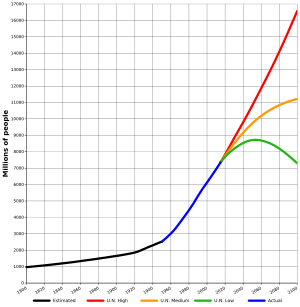
There are three possible projections: low, medium, and high. With the low projection the population is expected to actually decrease beginning around 2050. The medium projection shows it starting to flatten out around the same time. The high projection shows around ten billion people on the Earth by 2050. Most other estimates I have seen tend toward the higher number. Unless the numbers do actually start to decline, we will at some point reach the level that the Earth can't sustain the population. That would mean hard times for everyone. Just like a growing family in a small "starter" house, we are going to need more room. And if we were to somehow cure cancer, and aids, and end murder and war, what would that do the population?
What about natural disasters? In recent years large meteor impacts and close encounters have been in the news. There have been large impacts in the past. It is believed a large impact caused the extinction of the dinosaurs millions of years ago. Other large rocks from space have had devastating effects on the Earth. It is just a matter of time before it happens again. Will our society survive? Would the human race survive? I say the answer is a definite no on the first, and a likely no on the second. We are keeping our eggs all in one basket. We need to spread out.
Some might say we should shield ourselves. Again, there is only so much we can do. There is no way to completely protect ourselves and our planet from a large body crashing into it. And, whatever we can do would require a good space program! The only reason we know about a lot of the possibly dangerous rocks out there is because our small space exploration do date has made it possible.
So, it comes down to this. Even if you ignore all the proven benefits space exploration has already given us. Even if you deny that it will likely provide us many more as it gets more common and cheaper. There is still one great reason to invest more in space exploration. Our survival as a race depends on it. Overcrowding and a near certain major impact some time in the future will not allow us humans to continue living here as we do now. We need to find more places to go. Kids grow up and move out of their parents' homes. It's time for us to find a place of our own.
That is an ignorant and simple-minded point of view. The space program has brought countless benefits that have improved and saved lives, and continue to do so every day. Weather satellites have dramatically increased the accuracy of weather forecasting and can give early warning of large storms so that people can be evacuated. GPS and communication satellites have improved individual safety and made it possible to locate someone who is lost or injured, or allow someone immediate communication that may save their or someone else's life. Air, sea, and land navigation have become much safer thanks to communication and weather satellites. Experiments that could only be conducted in space have led to research that continues to help medical science. And all this with extremely expensive and limited availability to space. Currently, SpaceX and other private companies are trying to commercialize space and make it much cheaper and easily available. It isn't easy. Or cheap.
But I'm not here to talk about the benefits we have already received from space exploration. I want to talk about the one big benefit we will all gain. Survival of the human race. And we better get on it.
Currently, the Earth is holding about 7.2 Billion people. That number is growing exponentially. How many can it support? We are already feeling the strain. The UN is recommending we start eating insects because we need the land used to raise animals to eat to grow crops and build housing. Technology can only go so far. How many people can we feed and house? What will life be like when the planet gets so crowded that everyone is crammed together?
On the Wikipedia page on world population there is a nice graph of UN projections for population growth.
There are three possible projections: low, medium, and high. With the low projection the population is expected to actually decrease beginning around 2050. The medium projection shows it starting to flatten out around the same time. The high projection shows around ten billion people on the Earth by 2050. Most other estimates I have seen tend toward the higher number. Unless the numbers do actually start to decline, we will at some point reach the level that the Earth can't sustain the population. That would mean hard times for everyone. Just like a growing family in a small "starter" house, we are going to need more room. And if we were to somehow cure cancer, and aids, and end murder and war, what would that do the population?
What about natural disasters? In recent years large meteor impacts and close encounters have been in the news. There have been large impacts in the past. It is believed a large impact caused the extinction of the dinosaurs millions of years ago. Other large rocks from space have had devastating effects on the Earth. It is just a matter of time before it happens again. Will our society survive? Would the human race survive? I say the answer is a definite no on the first, and a likely no on the second. We are keeping our eggs all in one basket. We need to spread out.
Some might say we should shield ourselves. Again, there is only so much we can do. There is no way to completely protect ourselves and our planet from a large body crashing into it. And, whatever we can do would require a good space program! The only reason we know about a lot of the possibly dangerous rocks out there is because our small space exploration do date has made it possible.
So, it comes down to this. Even if you ignore all the proven benefits space exploration has already given us. Even if you deny that it will likely provide us many more as it gets more common and cheaper. There is still one great reason to invest more in space exploration. Our survival as a race depends on it. Overcrowding and a near certain major impact some time in the future will not allow us humans to continue living here as we do now. We need to find more places to go. Kids grow up and move out of their parents' homes. It's time for us to find a place of our own.
Thursday, June 25, 2015
Trailers
In a previous post I mentioned that I was going to try my hand at writing some books. I've been working at that lately and I have a couple of early sneak previews. There isn't a lot there yet, but you can consider them something like a trailer for a movie.
There are two books: one on electronics and one on embedded systems. The one on electronics is better thought out and more coherent. Here are the reasons for posting them as they stand.
1. You get a sneak preview of what is coming and you may even find something useful.
2. It gives me a way to track my progress.
3. You can provide feedback and help guide the development.
4. Helps keep people interested while they wait for the complete books.
Here is what I ask of you. If you are interested, take a look at what is there. Provide feedback to me on what you like or don't like. If you think it is crap, tell me that. If you see things that could be improved, let me know that. Keep in mind I'm not asking for proofreading -- there is a lot of editing yet to be done. What I am really interested in is how you like the overall feel of the books. Do they seem like they will be helpful? Do they explain things well? Too much hot air?
The books are located in the "projects" section of my web site, here:
projects
The files are in PDF format. I look forward to hearing what you have to say.
Sunday, June 21, 2015
Travel to the Beat of a Different Drum
Lately, I have run into some professional programmers that didn't even know what a kilobyte was. They are so used to dealing in megabytes and gigabytes that the idea of measuring memory in the thousands of bytes was foreign. With modern computer main memories measured in gigabytes and storage measured in terabytes we are spoiled. In the 1950s kilobytes were precious. And expensive. The first ten or fifteen years of computing was filled with new technologies to use as memory. In the past I have written about the vacuum tube registers in ENIAC and the mercury delay lines and CRT memories of later computers.
Another technology that found fairly widespread use in those days was the magnetic drum. Compared to delay lines and CRTs the magnetic drum memory was large. Typical sizes were 8 to 64 kilobytes early on and expanded later. Drums were used as main memory (RAM) and as storage, like a modern hard disk drive. They were manufactured into the 1970s and used until the early 1980s. They fell out of favor in the late 1950s and early 1960s as RAM when magnetic core memory became available. They were eventually replaced for storage by the hard disk drive.
A magnetic drum is similar in concept and operation to a modern hard disk drive (HDD.) But the HDD consists of flat disks that spin like an old vinyl record and store data on the flat surface. It normally has a single read/write head for each storage surface and the head has to move back and forth across the surface to read different tracks of data. In contrast, the magnetic drum was a single cylinder that stored data on the outside surface. It spun around the central axis and typically had a read/write head for each data track. That did away with the time needed to position the head over the needed track, but it still required time waiting on the proper data to spin around to the head. To help overcome the rotational latency waiting on the proper data to spin around, it was common to place the next instruction of a program at the data location on the drum that would be just coming available as the previous instruction completed. Some drum machines had the same number of read/write heads as the computer had bits in its instructions. With that arrangement, an entire word of memory could be read or written at once.
As an example, the drum used in the IBM 650 was 16 inches long and had 40 tracks. It could store 10 kilobytes. It spun at 12,500 RPM meaning that if you just missed the data you wanted you would have to wait 80 microseconds for that data to come back around. In these days of multi-gigahertz computers one microsecond delay is an eternity. But such were the rules of the game in those days.
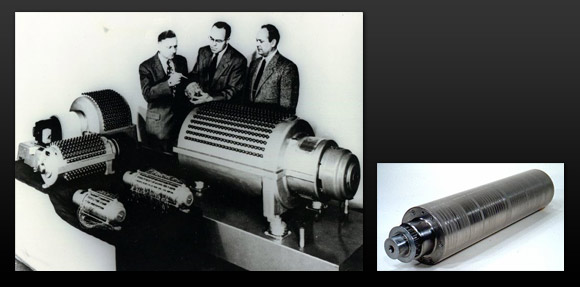
Magnetic drums from (left) UNIVAC computer and (right) IBM 650.
Photo from royal.pingdom.com
Magnetic core memory became available in the 1950s and gave the drum a short life as main memory. The cheaper, faster, smaller, and larger capacity of core quickly replaced the drum in most computers. As storage memory the drum lived a while longer. But the invention of the hard disk drive with similar improvements eventually killed the drum in that role as well. Core memory would rule for about 20 years and soon we will take a look at it.
Another technology that found fairly widespread use in those days was the magnetic drum. Compared to delay lines and CRTs the magnetic drum memory was large. Typical sizes were 8 to 64 kilobytes early on and expanded later. Drums were used as main memory (RAM) and as storage, like a modern hard disk drive. They were manufactured into the 1970s and used until the early 1980s. They fell out of favor in the late 1950s and early 1960s as RAM when magnetic core memory became available. They were eventually replaced for storage by the hard disk drive.
A magnetic drum is similar in concept and operation to a modern hard disk drive (HDD.) But the HDD consists of flat disks that spin like an old vinyl record and store data on the flat surface. It normally has a single read/write head for each storage surface and the head has to move back and forth across the surface to read different tracks of data. In contrast, the magnetic drum was a single cylinder that stored data on the outside surface. It spun around the central axis and typically had a read/write head for each data track. That did away with the time needed to position the head over the needed track, but it still required time waiting on the proper data to spin around to the head. To help overcome the rotational latency waiting on the proper data to spin around, it was common to place the next instruction of a program at the data location on the drum that would be just coming available as the previous instruction completed. Some drum machines had the same number of read/write heads as the computer had bits in its instructions. With that arrangement, an entire word of memory could be read or written at once.
As an example, the drum used in the IBM 650 was 16 inches long and had 40 tracks. It could store 10 kilobytes. It spun at 12,500 RPM meaning that if you just missed the data you wanted you would have to wait 80 microseconds for that data to come back around. In these days of multi-gigahertz computers one microsecond delay is an eternity. But such were the rules of the game in those days.
Magnetic drums from (left) UNIVAC computer and (right) IBM 650.
Photo from royal.pingdom.com
Magnetic core memory became available in the 1950s and gave the drum a short life as main memory. The cheaper, faster, smaller, and larger capacity of core quickly replaced the drum in most computers. As storage memory the drum lived a while longer. But the invention of the hard disk drive with similar improvements eventually killed the drum in that role as well. Core memory would rule for about 20 years and soon we will take a look at it.
Saturday, June 20, 2015
Riding the Rough C
C is probably the closest thing there is to a "standard" programming language. You would be hard pressed to find any modern computing system that doesn't have C available. Although it has somewhat fallen out of favor for large computing systems, like PCs (don't tell the Linux kernel developers that!) it is almost universally used for embedded systems. In the embedded world it is the runaway winner, although C++ is gaining ground.
But C (and C++) has a downside. I will write about C here, but keep in mind that pretty much everything I say applies to C++ as well. One of the characteristics of C that made it so popular is flexibility: one is allowed to do just about anything in any way they please. But that flexibility is the achilles heel. I am going to show a few examples to make the point. If you haven't been bitten hard by at least one of these, you can't call yourself a C programmer.
So, you know I'm going to show some examples of things that can gotcha in C. These will be isolated code fragments that you know have a problem. Even considering that, notice how difficult it is to find them all. Then consider you have one of these bugs somewhere in your thousand or so lines of code, but you don't know what or where. Consider how hard that will be to find. C gives you enough rope to shoot yourself in the foot.
Let's start simple:
if( my_array[n]=1)
printf("true\n");
else
printf("false\n");
What does that do? Hint: there is only one answer, with two parts, and it probably isn't what you think. First, it will set the array element "my_array[n]" to 1, even if that element doesn't exist, and then it will print "true."
It's likely you would have said something about "it depends on what is in my_array[n]." But it doesn't. The programmer probably meant to write "if( my_array[n] == 1)." The operator "==" is the equality comparison operator, and the operator "=" is the assignment operator. The "if" statement looks at the value of the expression within the parentheses to decide which branch to take. By writing "my_array[n] == 1" it would compare the value stored in my_array[n] to 1 and if they are equal execute the "true" part otherwise execute the "false" part. But writing "my_array[n] = 1" assigns the value 1 to the array element and an assignment returns the value assigned as the value of the expression. So, since 1 is always assigned, 1 will always be the value inside the parentheses, which is considered true, and the "true" branch will always run. Plus, you just put a 1 into your array. This is perfectly legal C and you might sometime want to do an assignment that way, but not likely in an "if" statement like that. But a standard C compiler must compile it as is, and most won't even give a warning. This one gets even experienced, professional programmers all the time.
Remember the other part of the answer? "Even if it doesn't exist?" What if you declare the array like this:
int my_array[20];
and when the "if" statement above runs n is equal to 20? The declaration "my_array[20]" means to allocate an array of 20 elements numbered 0 to 19. There is no my_array[20]. It doesn't exist. But the C compiler will happily produce code that writes the 1 to element 20. Since there is not an element 20, it will write over whatever is stored there! Chances are that some other variable is allocated that chunk of memory and it will get changed without you knowing it. That is a really nasty bug to find.
Here is another that is quite common and hard to find. It shows up in a lot of different forms and not always easy to even notice there is a problem.
int x = 10;
while( x>0);
{
printf(" x = %d, x^2 = %d\n", x, x*x);
--x;
}
What will it print? Nothing. The program will stop when it gets to the "while" statement. It goes into an endless loop, never getting to the next statement. In C, the while statement is defined to be like this:
"while expression statement"
A statement is terminated with a semicolon. Usually a statement does something, and a statement can be a compound statement, which is a series of statements inside curly braces ( "{ }" .) C also allows the "null statement" which is nothing terminated with a semicolon. Look at the while statement in the example above. The condition is "x>0" and the statement is the null statement ";". After that is a compound statement ( " { printf ....} "). That means the "null statement" (";") finishes off the while statement so no code gets executed as part of the "while" loop. The variable x never changes. It just keeps looping. Since the code below it (" { printf....} ") is a perfectly legal compound statement, the compiler will merrily compile it without any warnings. But the program will effectively halt at the "while" statement.
Here is another variation of that one:
int x = 10;
while( x> 0)
printf( "x = %d\n", x);
--x;
What does this print? An infinite series of "x=10" lines. Look again at the definition of the "while" statement. The "while expression" is followed by a single statement. Often, that will be a compound statement, but it can be a "normal" statement. In this example, the "printf" statement gets executed as the loop body. But since it is not a compound statement enclosed in curly braces, the next line ("--x") is not part of the loop body. It's all perfectly legal C and the compiler won't even warn you.
As I mentioned at the start, C is available everywhere. It is standardized. You would think this means it works the same everywhere, but that isn't true. A common development method, and one I recommend, is to develop code on a PC with C that will eventually run on a microcontroller. The PC has much greater resources for development and debugging and makes it much easier to write much of the code. But you have to watch out for differing behaviors. Take a look:
int x = 0;
while ( x < 40000)
{
// do something useful here
++x;
}
If you run that on a PC, say with Visual Studio or gcc, it will work just fine and "do something" 40000 times. But when you transfer that code to a small microcontroller, say an Arduino, it will hang at the "while" statement in an endless loop.
The C standard defines an "int" to be the "natural" size of integers for a given machine. On a PC, which is a 32 or 64 bit machine, an "int" will be either 32 or 64 bits and have a range of more than plus or minus 2 billion. But on an 8 or 16 bit microcontroller an "int" will be 16 bits. A 16 bit integer has a range of -32768 to +32767. Because of the way computer hardware works, as the variable "x" is counting up when it reaches 32767 and adds one, it "rolls over" from binary 0111111111111111 (32767) to binary 1000000000000000 (-32768), and start counting up again. But it can never reach 40,000. Your compiler may or may not give an error or a warning with this one, but there are plenty of variations that certainly will not.
C is a great language. It's very versatile and very popular. You can run it on just about anything and write any kind of code you want. But it is full of traps. I have only scratched the surface. It would be easy to fill a large book with examples. If you plan to use C (or C++), put in the effort to learn enough of the language to at least be able to recognize these pitfalls when you encounter them. There are plenty, and no list of examples could ever be complete. It will be up to you to watch for them and find them when, not if, they happen to you.
Wednesday, June 17, 2015
Hitting the High Notes
In college, I was constantly told by my professors how important it was to keep a lab notebook. They were right. Anyone who does technical things, either professionally or as a hobby, needs to keep a good notebook. As you progress through your hobby or career, the value of your notebooks increases. The little nuggets of hard-won knowledge are priceless. You can refer back to old notes and find solutions to current problems. You can look back at what you tried before and find out if it did or didn't work. You can track your progression over time. There are lots of other benefits, too.

Now imagine you suddenly got access to the notebooks of some very experienced engineers. You can imagine they would be full of useful information. Those notebooks certainly wouldn't relieve you of the obligation of taking your own notes, but they would be very valuable. Well, now you can.
Today, while visiting one of my favorite websites, embedded.com, I came across this article which is more or less a review of a new, free, e-book from Texas Instruments. I want to thank David Ashton for writing that review and I highly recommend you read it. I won't repeat his work: he's done a much better job of reviewing it than I could.
Embedded.com is geared primarily toward working engineers (although hobbyists should still read it!) Since a lot of what I write is aimed at hobbyists, I want to take a little different path. I want to tell you why should read the book and how you should use it.
Since this book is essentially a collection of notes from working engineers, it assumes you know what all the terms mean. For example, there is a section on modeling capacitors. It briefly mentions equivalent series resistance (ESR) and equivalent series inductance (ESL), but doesn't really explain what they are. A typical hobbyist probably won't really know what those terms mean. But that stuff is very important when it comes to how to actually use capacitors in a circuit and why. So here is what I recommend. Find a section of the book that is either relevant to what you are doing or that seems interesting. Read briefly through it and Google the terms you don't understand. Use the full names when possible (equivalent series resistance instead of esr) since you will get better results. Read through the explanation: Wikipedia often has good explanations. Then come back and read that section of the book again with your new knowledge. You will likely find a lot of mysterious things, like why certain types of capacitors are needed for different uses, will suddenly be much clearer.
As I mentioned above, don't just look up things as needed. Skim through the book looking for things that seem interesting or useful. Read those and Google what you don't know. Taking in the new knowledge in the context of how and why it is used will help to make the concepts much clearer than if you were just reading a textbook that explains them out of context.
I think this ebook is a great resource for hobbyists (and engineers!) Texas Instruments is huge and they produce a LOT of good documents. Not to mention useful parts. So download the book now. You will have to register with TI, but that isn't a bad thing. They might notify you of new, interesting parts and documents. Keep the book easily available on your computer and check it out often. Treat it as a virtual mentor, always available to ask questions.
Saturday, June 13, 2015
Living Trees and Dead Dinosaurs
I enjoy writing sometimes, when I think I have something useful or interesting to say. Perhaps that's obvious by the existence of this blog. I will leave it to your judgement whether anything I write is useful or interesting. I also enjoy teaching others the little bit that I know. I think that learning is a wonderful and pleasureful thing and I like helping others experience that. I also like to tell myself that I know a little bit about electronics and building and programming embedded systems.
Since the "maker movement" has caused a resurgence of interest in electronics and with it a new interest in embedded systems (e.g. Arduino, Raspberry Pi, Beaglebones in assorted colors, etc.) I think I may be able to add something. I've decided to write some books.
If you know me, you know that very often I start on a project and it never gets finished. There are a lot of reasons for that, but essentially it comes down to limited time. As a project goes on, I find new things that get my attention. So how am I going to keep interested long enough to finish? That's where you come in. If people find it useful and encourage me to continue, that will keep me interested. To make that happen, they will need to see the work in progress.
So, here is the plan. I have two books planned: one on electronics, and one on embedded systems. I have actually already written a good amount of the embedded systems book. The electronics book is just in outline form. As I complete a chapter I will post about it here, with perhaps a highlight or two. The actual book, as it develops, will be available as a download on my website. I hope to get feedback so people can tell me what they like or don't like about the book(s) as they are written. I can make changes I see fit and get encouraged to continue from that feedback. That's the plan. As I said, the results will depend on you and anyone else you find that may be interested. Feedback from readers will be essential.
Are you or someone you know interested in such a thing? Would you be interested in reading what I have to say about these subjects? If so, please leave a comment so I can gauge the interest up front. And point others that you think may be interested to this post.
Maybe you are wondering about the title of this post. I don't intend to publish these books in the traditional paper format. For now the intent is only to have them in pdf form online. So, no dead trees will be involved: they can continue to live. But some dead dinosaurs will have to give up their hydrocarbons to power your computer while you read. Sorry, but that's how my twisted mind works.
Remember to leave your feedback comments! Thanks.
Subscribe to:
Posts (Atom)